
by Lori Vande Krol | May 14, 2026 | Organization, Team Productivity, Technology, Tools
When I first started my career as a Productivity Consultant, paper was the largest clutter challenge for many of my clients. Even in our digital world today, people still struggle with paper overload, and data shows the “paperless office” is more of a goal than a reality. According to a 2025 study by the University of Illinois Urbana-Champaign, the average American office worker prints around 31 pages per day and uses 10,000 sheets of office paper per year.
The time and cost involved with managing paper clutter are enormous. While a good paper management system can definitely improve your chances of finding what you need when you need it, you still have printing costs, storage costs, and maintenance. One solution all business and home environments should consider is the near-paperless office. (As a sidenote, I don’t think a fully paperless office is typically reasonable or optimal, but most of us can greatly improve the intentionality of what we choose to have in paper format.)
While the task of creating a paperless environment may seem overwhelming, it doesn’t have to be. The following 5 steps help to break it into digestible pieces:
1. Reduce and Automate
First, reduce your incoming paper so you have less to manage. Almost everything today is created electronically, so you are already most of the way there! Use online and mobile applications to automate and digitize your processes as much as possible:
Creating processes to deal with incoming paper now will set the stage for a paperless office and simplify the work needed for the remaining steps.
2. Visualize and Analyze
Define what “paperless” means to you. Do you want to be near-paperless or just free up enough space to clear the clutter and maintain organized files? What information needs to remain in paper form and for how long? Who will need to access the information, and from where? What are your security needs?
When creating your vision for a paperless office, be sure to include everyone impacted. Get your whole team involved in a needs assessment. Determine how you would like electronic info to be organized, accessed, and shared. Determine retention guidelines for information, whether in paper or digital format.
3. Determine Tools & Resources
Next, determine what tools and resources you will need as you implement and maintain your paperless environment.
- Scanner: For most individuals and small businesses, I recommend the ScanSnap wireless desktop scanner. A scanner such as this with OCR capability will allow you to search file contents as well as the file name. As a bonus, content in scanned files can also be included in any future AI analysis.
- Paper Files and Boxes: For paper that you intend to keep in physical form, determine how it will be stored. For example, archived information can be stored in file boxes or bins, offered in various sizes. Be sure to label the box or use printable labels, including retention dates, for easy maintenance.
- Apps for Digital Files: Similarly, decide what systems will be used to store and manage digital files. Online solutions such as Microsoft 365’s OneDrive/SharePoint or Google Drive are great options. You might also share files using an industry application or collaboration tool.
- Other Tools: Also consider what you will use to back up your digital files and any tools or apps for mobile access.
An upfront needs analysis will save time and frustration later.
4. Create a Plan for Action
Depending on the extent of paper and the number of people involved, this could be a simple or a detailed project plan with goals, milestones, responsibilities, and target dates. A simple action plan would include:
- Declutter: First, declutter as much as you can (trash, shred, or recycle). Studies show that close to 80% of stored paper is not even needed! Consider holding an office clean-out day. During a recent 2-day Office Clean-Out that I facilitated, employees removed over 2 tons of paper from their building! And, this didn’t even include paper in their warehouse that was destroyed, or paper that they will scan and then destroy. You may be surprised at how much your paper is weighing you down.
- Archive Older Information: Once you have cleared the paper clutter, archive information past a certain date that needs to be kept but is determined unnecessary to digitize. This information can be stored off-site or in a location that is less accessible. Be sure to label the boxes or bins well, and keep an inventory of what is stored.
- Digitize strategically: Finally, for information you want to digitize, make a plan for scanning and storing it. You may choose to do this in-house or hire a scanning company to handle it for you. Consider how much scanning you will be doing, the types of information you will be scanning (documents, pictures, microfiche, books, etc), and if you want it to be searchable and editable. Document where the information will be stored, and how it will be organized, shared, and retrieved.
Reach out if you’d like a free checklist for planning and implementing a successful Office Clean-Out Day.
5. Maintenance
An important part of any paperless plan is a strategy for maintenance. If there are multiple people sharing a system, it’s helpful to choose a “champion” to ensure everyone using the system is trained appropriately and that standards, guidelines, and processes are documented and followed.
Taking the time now to plan for your paperless environment and creating the systems and habits needed to maintain it will result in years of time savings, reduced costs, and improved productivity.

by Lori Vande Krol | Apr 2, 2026 | General Productivity, Team Productivity, Technology, Tools
Artificial Intelligence has quickly become one of the most debated topics in business and society. Depending on who you ask, AI is either the greatest productivity breakthrough of our generation or a dangerous threat to jobs, privacy, and the environment. I believe both perspectives hold some truth, and with strict guidelines and security measures, we can harness its benefits while minimizing its risks.
Concerns around AI typically fall into three categories:
- Security and privacy risks
- Environmental impact from large-scale computing
- Fear of job displacement
These concerns should be addressed, but the real risk is not AI. It is using AI without intention, boundaries, or accountability.
AI is here to stay – it’s built into almost every technology tool and app we use – and wishing it away won’t solve anything. I believe the conversation we should be having is this: “How do we use AI responsibly in ways that advance the greater good?”
A Framework for Productive AI Use: The A.I.M. Model™
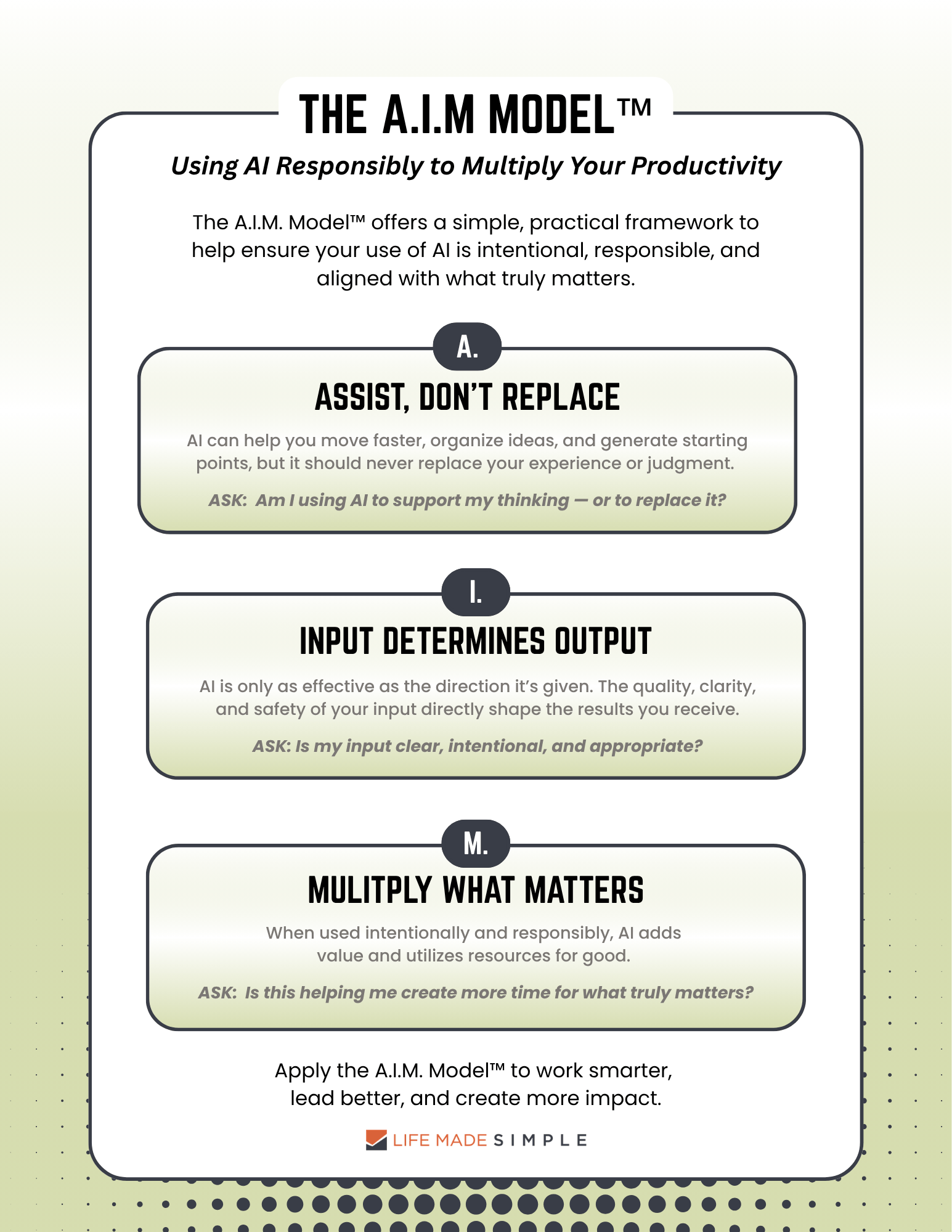
The responsible use of AI may feel like a big, global issue, but it starts with how each of us chooses to use it every day. The A.I.M. Model™ offers a simple, practical framework to help ensure your use of AI is intentional, responsible, and aligned with what truly matters.
A — Assist, Don’t Replace
AI should support your thinking, not take it over. It can help you move faster, organize ideas, and generate starting points, but it should never replace your experience or judgment. AI is just one tool in your decision-making tool chest.
I recently received an email from someone suggesting I check out “a quick AI prototype” based on the ART™ methodology I use with clients. I was intrigued, and so I tried it out. What I found was that it took much more time to prompt and run this AI prototype to assist with the Action-Reference-Toss decisions than it would to make the decisions myself (which goes completely against the purpose of ART™ – a tool to help make information workflow decisions quick and simple!)
AI will not always be the better solution, and we shouldn’t use it just because it’s there. As I recommend with any goal, define the need and your vision for a successful result, and then determine if AI can be a helpful resource to reach that goal.
I — Input Determines Output
AI is only as effective as the direction it’s given. The quality, clarity, and safety of your input directly shape the results you receive. This means two things:
- Be intentional with what you ask. Clear prompts lead to better outcomes.
- Be mindful of what you share. Know how your AI platforms use your information. Protecting sensitive information ensures safety and confidentiality.
Spending some time upfront to craft the best prompts will save time, resources, and frustration in the long-run.
M — Multiply What Matters
The true value of AI is not in doing more but in creating space for what matters most. When used intentionally and responsibly, AI adds value and utilizes resources for good. It also frees up time for more valuable, meaningful activities such as relationships, creativity, leadership, and strategic thinking.
It’s easy to fall into the trap of using your trusted chatbot for the latest trends, and I admit sometimes it can be fun. Like many of you, I also asked my AI assistant to “generate a caricature of me based on what you know about me so far.” But now that I know more, I realize it was not an intentional, responsible use of AI. While it was fun for a minute, it did not add value to myself or others and definitely did not improve my productivity. I was “doing more” for no good reason and wasting valuable resources at the same time.
I also find myself continuing in AI chats longer than I need to, even after I’ve achieved what I set out to do – it’s the chatbot version of “rabbit holes.” Most AI tools love these additional “value add” statements when answering your initial request: “If you want, I can also….” Before responding “Sure!”, pause to determine whether the extra time and energy are worthwhile.
The next time you open up ChatGPT, Claude, or Copilot, run through the A.I.M. Model™ as a guide to ensure your use of AI is both intentional and responsible.
Click below for a 1-page printable of the A.I.M. Model™
Responsible AI Use Within Business
If we take AI use a step further, we can look at how it shows up within organizations. Responsible AI isn’t just about the tools a company adopts, but about the culture it creates around how those tools are used. Leaders in this space recognize that AI should enhance their people and processes, and not replace accountability or judgment.
A responsible AI culture includes:
- Clear usage guidelines
Define expectations for how AI should (and should not) be used within the organization.
- Employee training and skill development
Teams should be equipped with the knowledge and confidence to use AI effectively and responsibly.
- Transparency with clients and stakeholders
Build trust by being open about when and how AI is used.
- Ethical boundaries
Establish guardrails to prevent misuse.
- Ongoing human oversight
Ensure that people remain accountable for decisions, outcomes, and quality.
The companies that will benefit most, internally and in their broader impact, are those that use AI intentionally and consistently apply these principles.
AI Provides An Opportunity We Shouldn’t Ignore
We are living through a shift similar to the arrival of the internet, smartphones, and social media. Those who resist will be left behind. Those who adopt recklessly will create problems. But if used the right way, AI offers an extraordinary opportunity to expand human capacity without expanding human hours.
The question is no longer whether AI will exist in our homes and workplaces – it’s here to stay. Like every transformative tool throughout history, its impact depends entirely on how humans choose to use it.
Additional AI Resources
As I was writing and refining this piece, I came across a few thoughtful perspectives on AI that you may find helpful:

by Lori Vande Krol | Jan 9, 2025 | General Productivity, Goals and Priorities, Motivation, Planning, Team Productivity, Time Management
“What if a goal is unachievable?” This question came from an audience member during a recent goal-setting workshop I presented. I suspect she was referring to a goal assigned by her “higher-ups” at work – a goal she felt was unreasonable. Many of us, at some point, have likely felt similarly about personal or professional goals. My immediate response was, “But what if it is possible? What could happen if you actually reached that goal?” Before dismissing a goal as unattainable, it’s worth taking a step back and evaluating why it feels out of reach.
1. Know why the goal is important to achieve.
Without a good understanding of why a goal is important, it’s hard to drive passion and motivation towards achieving it. Ask yourself, “What is the ultimate purpose of this goal?” Understanding the “why” can help you stay focused and committed, even when the journey gets tough. This clarity often reveals where the goal aligns with larger organizational or personal values, making it easier to prioritize and tackle.
2. Review current and needed resources to achieve the goal.
Are there resource limitations that may hinder progress toward the goal? This evaluation should include people, time, money, tools, and technology. If the goal is truly unachievable using current resources, a case should be made for including needed resources in the plan for that goal. For example, if you lack the necessary expertise, consider seeking training or outsourcing. Similarly, if time constraints are an issue, reevaluate deadlines to ensure they are realistic and manageable. You might also look for ways to automate steps or work to create other efficiencies.
3. Get everyone in the boat and rowing the same direction.
Even if all of the people impacted by a goal know and understand the “why,” you may still have team members who disagree with the goal. A rowboat reaches the finish line only if all team members are rowing together in the same direction. Think how far and fast you can go if everyone is in sync and working together. To achieve this unity, foster open communication, address concerns, and ensure everyone feels heard and valued. When team members share a sense of ownership over the goal, they are more likely to contribute wholeheartedly.
4. Break the goal into smaller milestones.
Sometimes a goal feels unachievable because it seems overwhelming. Breaking it into smaller, actionable strategies and steps can make it more manageable. Each milestone achieved provides a sense of accomplishment and builds momentum toward the larger goal.
5. Evaluate potential obstacles and solutions.
Identify the barriers that make the goal seem out of reach. Are they external, like market conditions or budget constraints, or internal, like skill gaps or low morale? Once identified, brainstorm potential solutions or workarounds. This proactive approach transforms challenges into opportunities for innovation.
6. Be open to revisiting and redefining the goal.
While it’s essential to push boundaries, some goals might need to be adjusted to reflect reality. If, after thorough evaluation, a goal remains unattainable, consider redefining it. Adjusting the scope doesn’t mean failure; it’s about being strategic and focusing on what can realistically be accomplished while still striving for excellence.
Final Thoughts
Unachievable goals can feel daunting, but they also present opportunities for growth and innovation. By understanding the “why,” assessing resources, fostering team alignment, and adopting a strategic approach, you can turn seemingly impossible goals into achievable ones. Remember, the journey toward a goal often teaches us more than the destination itself. Even if you don’t fully achieve the goal, the progress made can set the stage for future success.
For a list of goalsetting resources, check out our prior blog: Goal Setting is Hard.

by Guest Blogger | Oct 3, 2023 | General Productivity, Team Productivity
In the fast-paced world of business, efficiency is the name of the game. With competition getting tougher by the day, it’s crucial to optimize workflows to ensure your business runs seamlessly. The secret to this lies in a blend of intelligent automation, effective project management, team collaboration, and customer insight. By strategically employing these elements, businesses can not only survive but thrive in their respective industries, setting the stage for sustainable growth and success.
In today’s post, we’ll dive into some proven methods for streamlining workflow for more efficiency and productivity.
Assess Your Current Workflow Processes
The first step to enhancing productivity is understanding your current workflow. Analyze each process, identify bottlenecks, and determine areas where improvements can be made. This comprehensive review should not be a one-time event but rather an ongoing practice, as continuous improvement is the key to maintaining optimal performance levels. To get started, consider working with Life Made Simple. We’ll perform a productivity audit to help determine areas for improvement and help you develop a plan to reach your goals.
Harness the Power of Project Management
In the realm of business operations, project management plays a pivotal role in maintaining streamlined workflow processes. It acts as the backbone that holds together various elements, ensuring tasks are completed within set timelines and budgets. Effective project management fosters improved communication, facilitates resource allocation, and promotes risk mitigation, ultimately driving productivity and efficiency.
Regularly Seek Team Feedback
Your team is on the frontline of your operations, and their feedback is invaluable. Encourage open communication and regularly seek their input on how processes can be improved. This will not only enhance workflows but also foster a culture of continuous improvement and shared responsibility.
Embrace Automation Tools
Automation is the future of business efficiency. Intelligent automation tools, including automation success platforms, can streamline tasks, reducing the chance of human error and freeing up your team’s time for more strategic work. These platforms are designed to manage and assist in automating a wide range of processes, from data entry to customer service. By leveraging an automation success platform, businesses can drive their productivity to new heights, demonstrating the transformative power of automation in the modern workplace.
Streamline the Onboarding Process
A well-structured onboarding process can significantly improve a new employee’s productivity. By providing clear instructions, training resources, and a detailed overview of their responsibilities, you can help them hit the ground running. Moreover, integrating them into your workflows from day one ensures they’re contributing to your business’s efficiency as soon as possible.
Implement a Customer Data Platform
Understanding your customers is vital to business success. A Customer Data Platform (CDP) can provide deep insights into customer behavior, helping you tailor your products, services, and marketing strategies accordingly. As such, it’s important to explore solutions for a customer data platform that best fits your business needs. The right CDP not only boosts sales but also enhances customer satisfaction, fostering loyalty and repeat business. By leveraging a well-suited CDP, you’re investing in a tool that can significantly influence your business’s growth trajectory.
Eliminate Throwaway Meetings
Meetings can be a significant drain on productivity if not managed correctly, not to mention they’re not cost effective. Consider whether each meeting is necessary and what can be achieved via email or collaborative software. By eliminating unnecessary meetings, you free up time for your team to focus on their core responsibilities, enhancing overall productivity.
In today’s competitive business landscape, optimizing workflows is no longer an option, it’s a necessity. By reviewing your processes, using a project management app, automating tasks, investing in a CDP, and eliminating unnecessary meetings, you can boost your business’s efficiency and effectiveness. Remember, the journey toward optimized workflows is a continuous one, requiring regular reviews and adjustments. But with the right approach and tools, you can turn this journey into a smooth ride toward success.
Written by Robert Schmitt of enneathinggoes.com.

by Lori Vande Krol | Jun 22, 2022 | General Productivity, Goals and Priorities, Motivation, Procrastination, Team Productivity, Time Management
I have a confession to make. Months went by this year before I finally took focused time to set my annual goals. While I help others to do this daily and understand the importance and benefit of annual goal setting, I was not able to complete the task for myself. I took some time to reflect on my reasons for procrastinating on this task, which helped me to work through and complete the process. Following are a few reasons you might find goal setting difficult as well as some tips and resources to make it simpler.
1. The goal, outcome, or supporting actions, are unclear.
Too many times, I have gotten hung up on taking action because the end result, or the full range of steps I need to take to get there, is not completely clear. I have to remind myself that taking some action is better than nothing at all. Often, as you start to take action the goal and end result becomes clearer.
In his article, The Goal is Not the Point, James Clear says: ” In other words, your goal becomes your compass, not your buried treasure. The goal is your direction, not your destination. The goal is a mission that you are on, a path that you follow. Whatever comes from that path—whatever treasure you happen to find along this journey—well, that’s just fine. It is the commitment to walking the path that matters.”
When the goal or destination is not clear, consider your goal a direction you are heading, and clarify the end result as you go.
2. Setting big goals is scary.
There are many fears that can hold us back from setting and achieving goals. “What if I fail?” or “What if I succeed? Can I handle it? What comes next?” Perhaps it is a fear of change or a fear of losing control that is holding you back. In times like this, you must ask yourself, “What happens if I don’t try?”
Are you willing to live with more of the same? The status quo? Or are you willing to accept some risks and potential challenges in order to grow and achieve more? What great things might happen, for yourself and others, if you succeed? Take time to evaluate your fears. Learn what is driving the fear and anxiety in order to push forward. You may find that you even enjoy the journey.
3. Goal setting has not been successful in the past.
Last fall I was presenting a course on procrastination. When discussing potential reasons for procrastination, I shared that we often fail to take action when the end goal is unclear. An attendee raised her hand and asked, “What is the point of setting goals? It never works.” I challenged her to think more deeply about her hesitation toward goalsetting. I asked if there was possibly something else holding her back. After the presentation, we talked further, and I learned that she had worked for large corporations most of her career. Those companies would go through the annual goalsetting process, but it would end there. Management would not follow through or follow up on the actions required to achieve those goals. Goals were not reviewed regularly. Employees were also unclear on how the company’s goals tied to their own vision and goals. The lack of a full system for goal setting and implementation caused it to fail, and employees no longer trusted the process.
If goal setting has not been successful for you in the past, reflect on the true reasons for this. What can be done differently to improve your chances of success? There are many tools and tips to support individual, team, and company goalsetting. The systems and processes used need to work for everyone involved. Below I share additional resources for successful goalsetting.
The potential reasons for avoiding the task of goal setting are not unlike the reasons for procrastinating any task. The first step is working to understand your unique reasons for avoidance and then to find the right tool and process for you and/or your team. There is no doubt you will grow and achieve more.
Additional Resources for Goal Setting
Goal Setting: A Scientific Guide to Setting and Achieving Goals by James Clear
Mastering Time Management: What To Do Before the To-Do List by Lori Vande Krol
Do You Have a Lot of Big Goals? Focus on What You Know and Love by Lori Vande Krol
The Superman: Goal Achieved by Lori Vande Krol
The ProAction Planner™: a system to turn your annual goals into action throughout the year
FREE DOWNLOAD: Use the button below to receive a free Annual Goal Setting Template
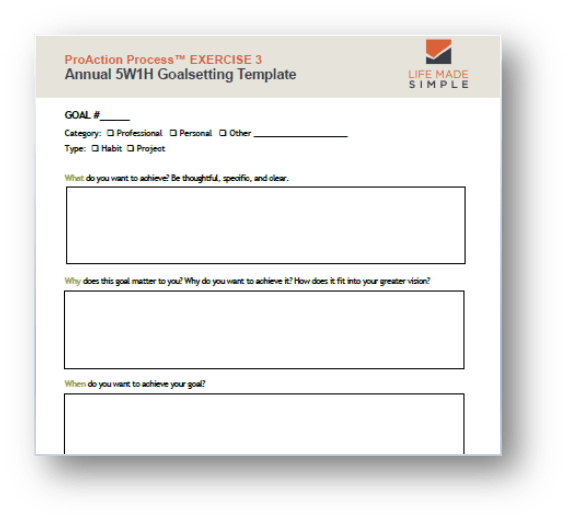
Annual 5W1H Goalsetting Template
FREE DOWNLOAD
It is not too late to set your annual goals for this year! If you’d like assistance with the goal-setting process, or in setting up systems for success, contact Lori at Life Made Simple or schedule your free 30-minute consultation. I’d love to help!

by Lori Vande Krol | Feb 24, 2021 | Goals and Priorities, Meetings, Team Productivity, Technology, Time Management
The availability and ease of Zoom and other virtual technology has been one of the bright sides of this past year. Without it, we wouldn’t be able to see our colleagues and friends while working safely at home, continuing education opportunities would be minimal, grandparents may not see their grandchildren whether it be a few miles or thousands of miles away, and those sick in the hospital may not be able to see their family. One of my favorite things about virtual calls during Covid is being able to see full faces instead of masked ones. But, according to a recent study done by Stanford University professor Jeremy Bailenson, founding director of the Stanford Virtual Human Interaction Lab, being in these virtual meetings throughout your day can lead to exhaustion and may even increase stress.
The Mercury News summarizes the findings and suggestions from Professor Bailenson’s study, which addresses Zoom Fatigue from a technical and physical perspective. Here I share three additional ways we can minimize this stress and exhaustion from the standpoint of planning and productivity.
Be Intentional About Holding a Virtual Meeting
If you are the one initiating the meeting, determine whether the meeting is absolutely necessary and if so, if virtual is the most appropriate format. Would a phone call or conference call work just as well? Or is the topic something that could be handled quickly over email or chat?
If you have been invited to a virtual meeting or webinar, determine whether it is necessary for you to attend. What value will you receive? What will you add to the meeting? Be intentional about your choices.
Block “Meeting Days” and Add Breaks
If you have been intentional about the meetings you attend and it is still necessary for you to have several meetings a week, try to hold meetings on the same day as much as possible. While you may still have some Zoom fatigue at the end of that day, the benefits of one or two meeting-free days are great. You will be able to focus for longer periods of time with fewer interruptions and without the nagging feeling in the back of your mind that you need to remember to log in at a certain time. You’ll also save a little time on those days you don’t have to be “Zoom ready.”
When you schedule several meetings on the same day, be sure to leave a little time between them – I suggest 30 minutes. This allows a cushion in case the meeting runs over and also gives you time to review your notes, clarify and schedule next actions, and reset before the next meeting. Be sure to leave a few minutes to get up, move around, and refill your water.
Meeting Standards Don’t Change in a Virtual Setting
Standards and guidelines for a video meeting should be the same as an in-person meeting (except that sweatpants or leggings and a quiet pet in the background is perfectly acceptable). Someone should be responsible for the agenda, make sure that everyone has the materials they need ahead of time, and assign a leader to keep the meeting on track. Also, don’t end the meeting without full clarity regarding next actions and who is responsible. Learn the 5 key steps to an effective meeting.
I also recommend allowing a few minutes at the beginning of the meeting to check in with everyone. It’s been a tough year, and we could all use a little reassurance, support, and reminder that we’re all in this together.

Recent Comments